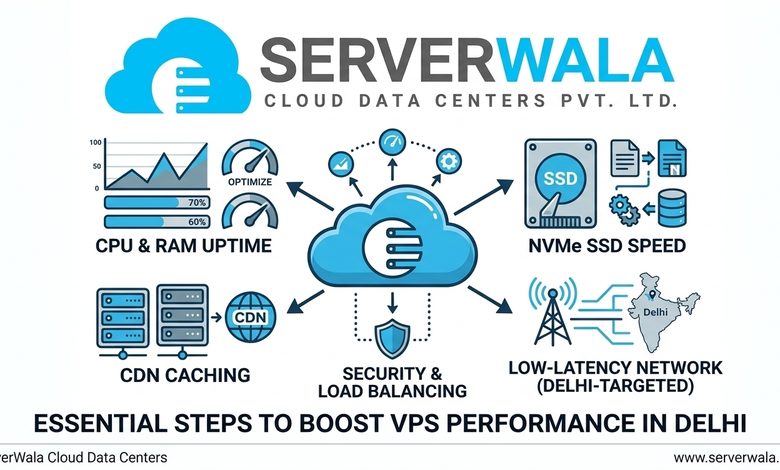
VPS Server Delhi offers the opportunity to gain high performance, flexibility, and control that is needed to host websites, applications, databases, and other services. But purchasing a powerful VPS server is not the final step towards achieving fast and stable performance of your VPS server. It is very important to optimize the server configuration, resource management, software tuning, security, and monitoring to get maximum performance and avoid any issues. VPS Hosting Delhi will allow businesses that are offering their products and services to customers located in Delhi, Noida, Gurgaon, and other cities of India to increase the speed of websites and applications.
Business website, eCommerce website, WordPress website, SaaS applications, databases, and development environments – all these types of software and websites hosted on the VPS Server Delhi can be optimized in order to boost the server performance. In this article, we are going to discuss effective methods for VPS optimization.
1. Choose the Right VPS Configuration
Good server performance relies on choosing the right kind of VPS configuration for the job. When you are buying VPS Hosting in Delhi, look at how many CPU units, how much RAM, how much storage space, and what bandwidth do your applications need. Your needs will vary based on the type of applications you are using. Take into account the following points:
- Website traffic
- Number of applications
- CPU requirements
- RAM requirements
- Storage capacity
- Database size
- Bandwidth requirements
- Expected future growth
2. Monitor CPU and RAM Usage
A situation where your server constantly lacks resources will affect its performance no matter how efficiently the software is set up. A correctly sized Delhi VPS Server will allocate sufficient resources for the smooth running of the application without any extra costs.
Resource monitoring is one of the simplest methods for detecting performance issues. Excessive CPU activity may be due to resource-intensive programs, poorly optimized scripts, heavy traffic, or background activities. In the same way, inadequate RAM can make applications sluggish and increase swap space usage. Some of the resource monitoring tools that Linux VPS users can utilize include top, htop, free, and vmstat. Pay attention to:
- CPU utilization
- RAM usage
- Swap usage
- Load average
- Disk usage
- Disk I/O
- Network traffic
If your VPS Server in Delhi regularly reaches its resource limits, investigate the cause before simply upgrading the server.
3. Keep the Operating System Updated
Outdated OS is likely to influence not only security but also performance. Install OS updates and patches on a regular basis. The latest version of the software may contain bug fixes, improved performance, as well as enhanced security features. But do not forget about uninstalling useless software packages and applications.
Each extra software running on your VPS consumes some system resources. Uninstallation of unused software will allow you to save CPU, RAM and disk space. A clean and updated OS becomes a good basis for fast performing VPS Hosting Delhi.
4. Use SSD or NVMe Storage
Storage speed can have an influence on the performance of your VPS server. The performance of the storage depends on the speed at which data is read from and written to storage. SSD Storage is usually much faster than normal HDD storage, whereas NVMe storage can offer even better storage speed. If you want to get a VPS Server in Delhi, make sure that your hosting package has fast storage like:
- MySQL and MariaDB databases
- eCommerce websites
- Content management systems
- Web applications
- Large file operations
- Application development
- Data-intensive workloads
If disk I/O is one of your biggest performance bottlenecks, moving to faster storage can provide a noticeable improvement.
5. Optimize Your Web Server
Your server configuration has an effect on website response time and the maximum connections your server can handle. NGINX and Apache are examples of web servers that can be configured for better performance depending on the type of application. Some of the factors you need to optimize are:
- Worker processes
- Connection limits
- Keep-alive settings
- Compression
- Static file delivery
- Browser caching
- HTTP/2 or HTTP/3 support
Do not copy any configuration files from other servers without first understanding their meaning. The best configurations are dependent on the number of CPUs, RAM, amount of traffic, and application needs that you have. Having an optimally configured web server can help your VPS hosting in Delhi to cope with more visitors.
6. Enable Website Caching
Caching is one of the most effective ways to reduce server workload. Without caching, a server may need to generate the same page or retrieve the same information repeatedly. A caching system can store frequently requested content and serve it much faster. Different types of caching include:
- Page caching
- Browser caching
- Object caching
- Database caching
- Application caching
In the case of WordPress sites, the implementation of a proper cache method can help save PHP processing and database queries. For bigger applications, technologies like Redis and Memcached can be utilized for the data that is frequently used. Caching can help a VPS Server in Delhi handle more users without making any urgent changes to the resources.
7. Optimize Your Database
Database performance can have a major impact on applications hosted on a VPS. Slow queries, missing indexes, oversized tables, and inefficient database configurations can increase CPU and RAM consumption. If your VPS hosts a database-driven application, regularly review database performance. Useful optimization practices include:
- Identifying slow queries
- Creating appropriate indexes
- Removing unnecessary data
- Optimizing database tables
- Cleaning temporary information
- Reviewing database configuration
- Maintaining regular backups
For MySQL or MariaDB applications, slow-query analysis can help identify database operations that require optimization. A faster database can make the entire application more responsive.
8. Optimize Images and Website Files
In some cases, it could be that the VPS does not cause a slow website. Large images, videos, JavaScript, CSS and other content can make your site slower to load. Be sure to optimize your images before uploading and use new image formats. There is also another way you can speed up your website:
- Compressing images
- Minifying CSS
- Minifying JavaScript
- Removing unnecessary scripts
- Enabling lazy loading
- Compressing HTML
- Reducing unnecessary third-party resources
Reducing page size allows visitors to download content faster and reduces the amount of bandwidth used by your VPS server in Delhi.
9. Use a Content Delivery Network
Content delivery network (CDN) is one way that can help you optimize the use of your VPS. Rather than visitors making requests for images, stylesheets, and JavaScripts directly from your VPS, the CDN would host them from different geographical locations. Using a CDN would help you improve:
- Website loading speed
- Static content delivery
- Global performance
- Bandwidth efficiency
- Server workload
For businesses using VPS Hosting Delhi, a CDN can be particularly useful when the website receives visitors from different cities or countries.
10. Improve Server Security
Security issues can also be performance issues. Malware, unauthorized processes, brute force attacks, and infected applications can hog up CPU, memory, storage, and network bandwidth. Safeguard your VPS Server in Delhi with these basic security guidelines. These are:
- Using strong passwords
- Keeping software updated
- Configuring a firewall
- Disabling unnecessary services
- Limiting open ports
- Using SSH keys where appropriate
- Monitoring login attempts
- Installing security updates
- Maintaining regular backups
A secure VPS is less likely to experience unexpected resource consumption caused by malicious activity.
11. Remove Unnecessary Processes
Over time, servers often accumulate applications and background services that are no longer required. Regularly review running processes and determine whether each service is necessary. Check for:
- Unused applications
- Unnecessary background services
- Old plugins
- Temporary files
- Unused packages
- Large log files
- Unnecessary scheduled tasks
Removing unnecessary processes can free system resources and help your Delhi VPS Server focus on important workloads.
12. Manage Server Logs
Logs are vital when it comes to troubleshooting, monitoring security, and detecting issues with applications. It is crucial to ensure that your log files do not get too large by managing your logs effectively. Rotate your logs to make sure that old logs do not take up too much disk space. Retain those logs that are necessary for security, troubleshooting, and compliance and get rid of the unnecessary ones.
13. Schedule Backups During Off-Peak Hours
Backups are important, but extensive backup activities may temporarily use the computer’s processing power, RAM, disk usage, and network bandwidth. Try scheduling intensive backup activity in time slots when there is little traffic on the website. For instance, an organization that makes use of VPS Hosting in Delhi for its web store may perform comprehensive backups during off-peak hours such as late nights. Do not shy away from performing backups just because they require resources. Perform intelligent backups and maintain multiple backups as per organizational needs.
14. Optimize PHP and Application Settings
For websites using PHP, the PHP settings can affect the performance of the server. Look at PHP memory limit settings, time settings, and the PHP-FPM process manager worker settings depending on your workload. Remove unnecessary plugins for the CMS in use.
In the case of WordPress websites, too many plugins will lead to increased database queries and PHP processing. Retain the ones that are really needed, and also keep them updated. Optimization at the application level can result in more gains than upgrading VPS resources.
15. Monitor Network Performance
The performance of the network itself is also an important aspect of hosting. While choosing the VPS Hosting Delhi, pay attention to such aspects as the bandwidth, network stability, latency, routing, and uptime. It may be useful for you to choose a server that is physically close to your target audience, especially if the majority of visitors come from Delhi or other Indian cities.
Nevertheless, server location is not the only important thing. There is also network traffic, limited bandwidth, application response time, etc.
16. Upgrade Resources When Necessary
Optimization can solve many performance problems, but sometimes your workload has simply outgrown the current VPS. If CPU, RAM, storage, or bandwidth usage remains consistently high, consider upgrading the server. You may need:
- More CPU cores
- Additional RAM
- Faster NVMe storage
- More storage capacity
- Higher bandwidth
Another one of the key benefits of VPS hosting in Delhi is that it is easy to scale the resources depending on the service provider and infrastructure available. It is always best to measure what resource you need by observing the system and then proceed to scale the resource.
How to Maintain Long-Term VPS Performance
VPS optimization should not be treated as a one-time task. Server performance can change as traffic, applications, databases, and business requirements grow. Create a regular maintenance routine that includes:
- Checking CPU and RAM usage
- Reviewing disk space
- Monitoring network traffic
- Installing security updates
- Optimizing databases
- Checking application logs
- Testing backups
- Removing unnecessary software
- Reviewing website performance
Continuous monitoring makes it easier to identify problems before they significantly affect users.
Conclusion
Optimizing VPS Server Performance in Delhi would require the correct use of the available hardware and software resources and caching, as well as database management, proper security, and monitoring of performance. Identify your primary problem before making random configurations to your system and monitor CPU, RAM, storage, disk I/O, network traffic, and application performance. Optimize the particular area in which your server performance is hampered.
For organizations utilizing VPS Hosting services in Delhi, maintaining a well-configured server can lead to optimal performance and flexibility along with being highly scalable and affordable. Regardless of whether you host a business site or an e-commerce website, a database, SaaS platform, or a web application, you can make the most out of it through VPS optimization. Choose ServerWala VPS Server Delhi for fast, secure, and scalable VPS hosting designed to deliver reliable performance for businesses, websites, applications, and growing online projects.